


Quick answer
How do you build a WooCommerce cake ordering system?
Combine a dropdown for size and flavor, a checkbox group for mix-ins or toppings, a required text field for the cake message with a character limit, an optional file upload for a reference photo, and a date field for the collection date. Price the size with fixed or per-quantity pricing, and set the message field's maximum length to whatever actually fits on the cake.
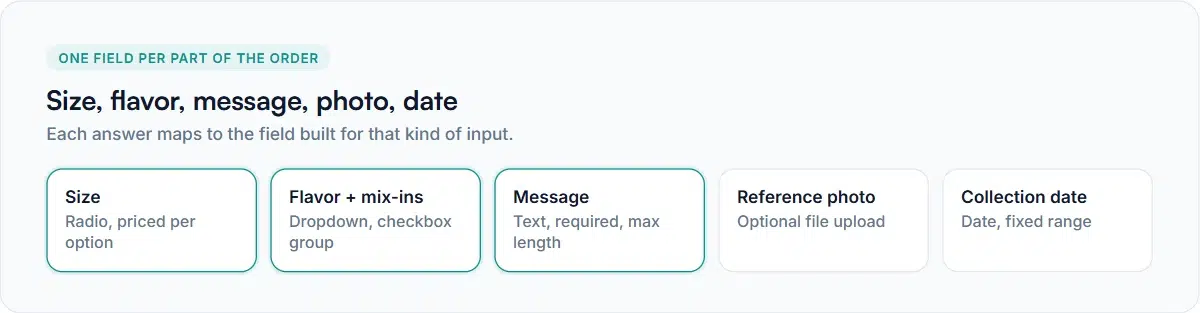
A cake order collects more different kinds of answers than almost any other custom product: a size that changes the price, a flavor that doesn’t, an optional list of add-ins, a short piece of text that has to physically fit, maybe a photo to match, and a date that has to be far enough out to actually bake it. A WooCommerce cake ordering system is really just picking the right field for each of those and pricing the ones that should cost more.
Fields for a WooCommerce cake ordering system, and why each shape fits
Size — radio or dropdown, priced
Size is usually the price driver. A radio field with fixed pricing per option works well when there are three or four sizes: 6-inch at no extra cost, 8-inch and 10-inch each adding a set amount. If your pricing genuinely scales with a number — servings, tiers — a formula referencing that number is more accurate than a fixed step per size.
Flavor and mix-ins — dropdown plus checkbox group
Flavor is usually one choice, so a dropdown or radio field fits. Mix-ins and toppings are usually several at once, which is what a checkbox group field is for — each option can carry its own price, so “add fresh berries” costs more than “add sprinkles” without any extra configuration.
The cake message — text, with a hard limit
This is the field most cake stores get wrong by leaving unlimited. A text field for the message should have a Maximum length set from the actual piping space on your smallest cake board, not a round number picked without measuring. The validation guide covers how the limit is enforced — the order is rejected before it reaches your kitchen if the message is too long, not after.
If the message can add its own cost — a longer message, more icing, more time — custom price fields or a flat per-character surcharge are the tools for that, though most bakeries price the message as included and cap the length instead.
A reference photo — optional file upload
For custom designs, an optional file upload field lets a customer send a photo to match. Restrict it to image types (PNG, JPG) and a size limit that’s generous enough for a real phone photo — several megabytes, not a few hundred kilobytes. It reaches your order screen as a private, non-public file, the same as any other upload; see the secure upload guide for what “private” actually means here.
The collection date — a date field, with an honest limit
A date field can be given an earliest and latest allowed date, which stops someone selecting a date in the past or booking six months out if you don’t take orders that far ahead.
One honest limit worth knowing before you rely on this: the earliest and latest dates are fixed calendar dates you set, not a rolling “always at least 3 days from today” rule. If you need 48 hours’ notice, you’ll need to update the earliest date yourself as time passes — there’s no setting that recalculates it automatically. Most bakeries handle this by reviewing and adjusting the date range weekly, or by treating the field as a rough filter and confirming the real timeline by phone or email after the order lands.
Putting your WooCommerce cake ordering system together
- Go to Smart Add-Ons → Add-On Groups and add a group scoped to your cake product, or to a Cakes category if you sell several.
- Add size (radio, priced), flavor (dropdown), mix-ins (checkbox group, priced per option), message (text, max length, required), reference photo (file upload, optional), and collection date (date, with a range).
- Order the fields so size and flavor come first — they change the price — and the date comes last, since it doesn’t.
- Open the product and build a real order as a customer would, checking the live price updates as you pick a size and add-ins.
- Place a test order and confirm the message, date and reference photo all appear correctly on the order screen.
Common questions
Can I hide the reference photo field unless a custom design is chosen?
Yes — that’s exactly what conditional logic is for. Show the upload field only when a “Custom design” option is selected elsewhere in the group, so a plain cake order doesn’t prompt for a photo it doesn’t need.
Should a WooCommerce cake ordering system use variations or add-ons for tiers?
In a WooCommerce cake ordering system, if each tier count is a genuinely separate item with its own stock and lead time, a WooCommerce variation fits. If it’s really the same product priced differently by a number of tiers, that’s an add-on field, usually with formula pricing. The variations guide covers making that call.
Can I limit how many cakes I take per day?
Not through the date field itself — it constrains the date range, not the number of orders on a given date. That’s a capacity limit you’d manage by watching orders as they come in, or through a separate booking or inventory tool if your volume needs it automated.
For the underlying fields in more depth, see the date picker guide and the required fields guide, and WooCommerce’s own product management documentation (opens in new tab) for setting up the base cake products themselves.


Comments