Quick answer
What can you customize on a WooCommerce product page?
Almost anything a customer needs to tell you before you make or pack the order: text to engrave, a color swatch, a size, toppings, a delivery date, an uploaded logo, or a tip. Each of the ten examples below lists the option fields that store type uses, links to a step-by-step guide, and, for nine of them, opens a working product on our demo store that you can configure yourself.
These WooCommerce product customization examples come from the ten products on the Smart Add-Ons demo store and the guides we wrote while building them. The field lists are the real ones on each demo product, so what you read here is what you can click. WooCommerce itself doesn’t include these option fields; if that’s new to you, start with what product add-ons are.

10 WooCommerce product customization examples by store type
1. Personalized gift boxes
Fields: box size and gift wrapping (radio), add-ons (checkbox group), recipient name, gift message and card artwork upload that appear only when the matching add-on is ticked, a preferred delivery date, and an optional tip (custom price). Try it: Personalized Gift Box demo. Guides: gift wrap option and corporate gift store.
2. Jewelry and engraving
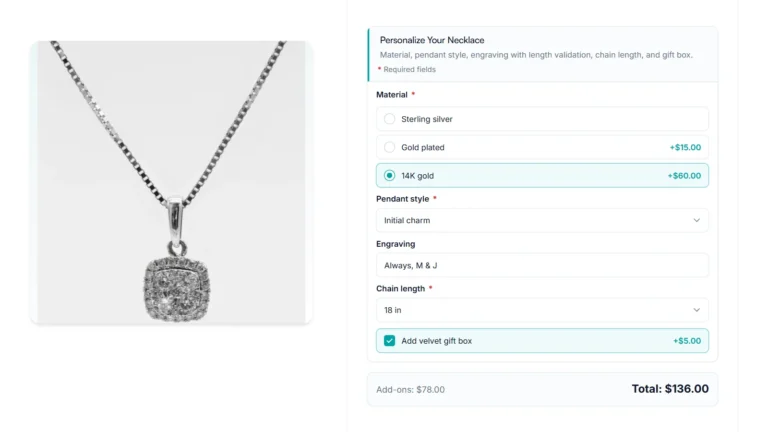
Fields: material (radio), pendant style and chain length (dropdowns), engraving text, and a velvet gift box checkbox. Limit the engraving length to what fits the piece. Try it: Personalized Necklace demo. Guide: product options for jewelry stores.
3. Custom T-shirts and apparel
Fields: size (dropdown), color (image swatches), print location (radio), custom text, artwork upload, and back design notes that appear only when the print location includes the back. Try it: Premium Custom T-Shirt demo. Guide: T-shirt customization store.
4. Personalized mugs
Fields: engraving text, color (radio) and a gift wrap checkbox. Three fields are enough for a simple personalized product. Try it: Personalized Ceramic Mug demo. Guide: personalized mug store tutorial.
5. Cakes, cookies and bakery orders
Fields: box size (radio), flavor mix-ins (checkbox group), dietary preference (radio), vegan-compatible flavors shown only for vegan orders, a message for the custom cookie shown only when that mix-in is ticked, and a delivery note. Try it: Build Your Own Cookie Box demo. Guide: cake ordering system.
6. Pizza and food ordering
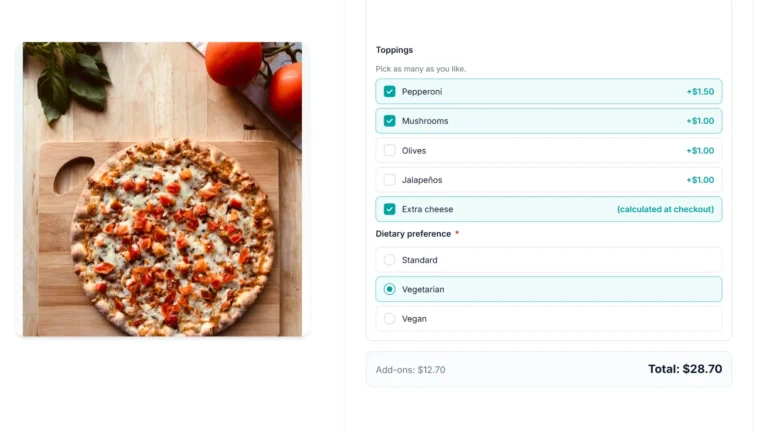
Fields: size and crust (radio), sauce (dropdown), toppings (checkbox group, each with its own price), dietary preference, and a vegan cheese checkbox that appears only for vegan orders. Try it: Custom Pizza Builder demo. Guide: product options for food ordering.
7. Print-on-demand and stationery
Fields: paper style (dropdown), monogram (text), dedication line (textarea) and a cover design upload with allowed file types and a size limit. Try it: Personalized Leather Notebook demo. Guide: print-on-demand file upload.
8. Furniture and made-to-measure products
Fields: material and finish (radio), width and length (dropdowns), a hairpin-legs upgrade checkbox, and an extended warranty offered only for one material. For prices calculated from dimensions, see WooCommerce formula pricing (Pro). Try it: Custom Furniture demo.
9. Product builders and bundles
Fields: size (dropdown), color (radio), a padded laptop sleeve checkbox that reveals a sleeve size dropdown, and accessories (checkbox group). Try it: Travel Backpack Builder demo. Guide: product builder with multiple add-on groups.
10. Photography and other services
Fields: package, add-ons, preferred date, venue and reference photos. A date field records the customer’s preferred date; it doesn’t check your calendar, so confirm availability after the order. Guide: photography booking store. There’s no demo product for this one.
What these WooCommerce product customization examples have in common
- Pick-one choices come first. Size, material or package set the base, so they go at the top and are required.
- Follow-up fields stay hidden until needed. Six of the ten demo products use at least one conditional rule. See conditional product options.
- Paid extras are optional checkboxes. Gift wrap, a gift box or a warranty is one tick, with the price next to it. See add-on pricing.
- Free text needs a limit. Give engraving and message fields a maximum length so the result fits the product.
If your choices are a fixed list that you stock separately, such as shirt sizes with their own inventory, use variations instead; options vs variations explains where the line is. WooCommerce’s own documentation covers variable products (opens in new tab).
WooCommerce product customization examples FAQ
Do I need a separate plugin for each kind of product?
No. All ten WooCommerce product customization examples above use the same ten field types from one add-ons plugin. What changes is which fields you combine and which conditional rules connect them.
Can I reuse one setup across many products?
Yes. In Smart Add-Ons an add-on group can apply to a single product, a whole product category, or every product, and a group can be saved as a template or exported to another store. See add-ons by category.
Which plugin do these examples use?
The demo store runs Smart Add-Ons, which we make. Other add-ons plugins can build similar forms; our comparison of the best WooCommerce product add-ons plugins covers eight of them, including free ones.