Quick answer
Is Smart Add-Ons a good Barn2 Product Options alternative?
For many stores, yes, and for some, no. Both plugins have conditional logic, formula pricing, file uploads, image swatches and a live demo. Barn2 WooCommerce Product Options lists more field types (16+) and supports price per character, and costs $149 a year for one site. Smart Add-Ons Pro also costs $149 a year but covers three production sites, and adds an add-on analytics dashboard and A/B testing. Pick Barn2 for the widest field set; pick Smart Add-Ons for several stores or for testing which options sell.
Barn2 is one of the best-known WooCommerce plugin vendors, and its Product Options plugin is a strong product. If you’re looking for a Barn2 Product Options alternative, it’s usually because of price per site or because you want to measure how your options perform. We make Smart Add-Ons, so this comparison sticks to facts: Barn2’s details come from its product page (opens in new tab), checked on 1 October 2026, and we list where Barn2 comes out ahead.
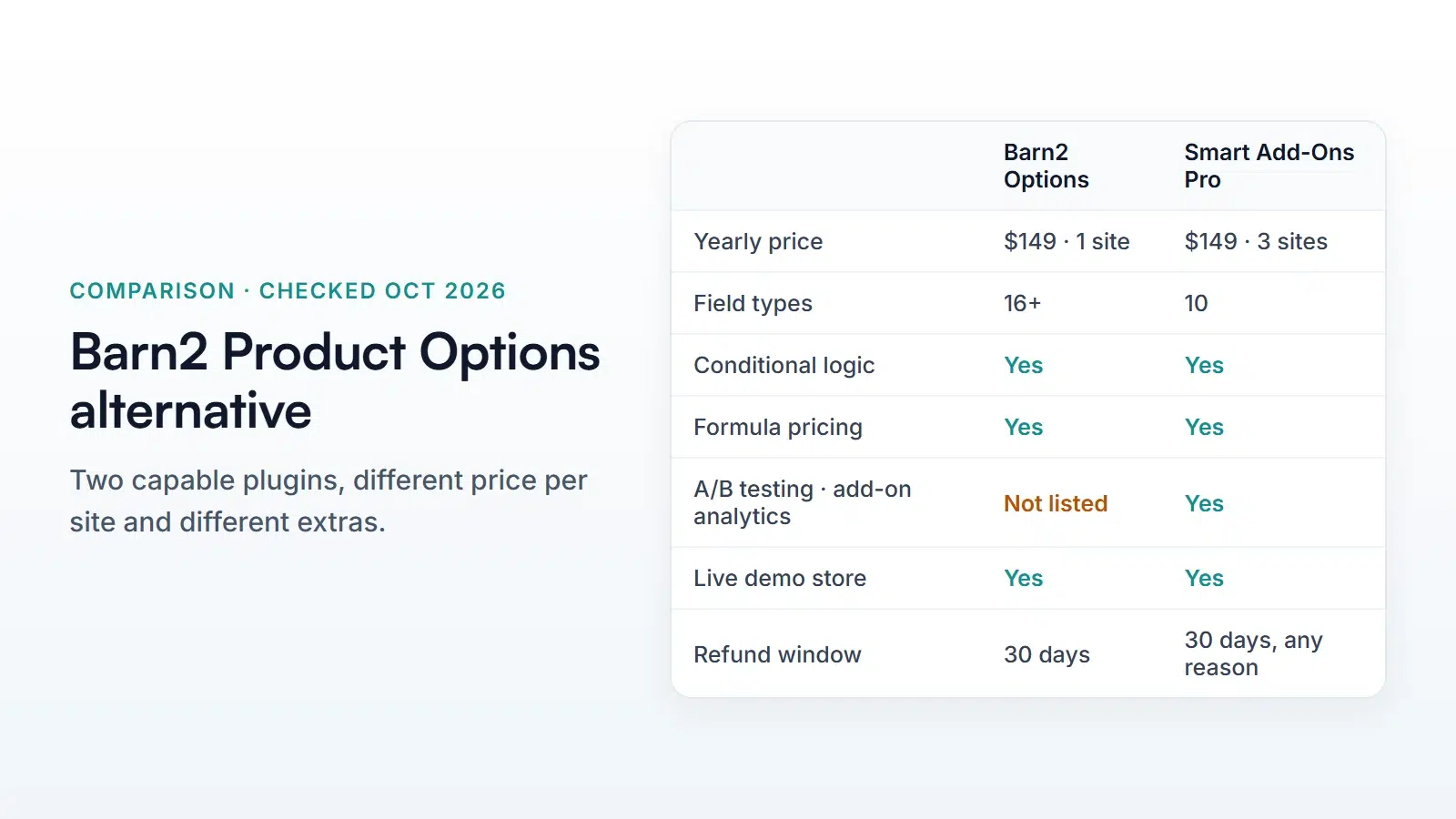
Barn2 Product Options alternative: side-by-side
| Barn2 WooCommerce Product Options | Smart Add-Ons | |
|---|---|---|
| Price / year | $149 one site, $249 up to five sites | $89 Starter (one site), $149 Pro (three sites) |
| Field types | 16+ | 10 |
| Conditional logic | Yes | Yes, every plan |
| Formula pricing | Yes | Pro |
| Price per character | Yes | No |
| File uploads, image swatches | Yes | Yes |
| Add-on analytics dashboard | Not listed | Pro |
| A/B testing of option groups | Not listed | Pro |
| AI upsell suggestions | Not listed | Pro |
| Live demo | Demo site and editable admin demo | Demo store |
| Refund | 30 days | 30 days, any reason |
Where Barn2 comes out ahead
- More field types. Barn2 lists 16+, including number fields, color swatches and a products selector. Smart Add-Ons has ten.
- Price per character. Barn2 can raise the price for each character typed into a text field, which suits engraving and embroidery priced by the letter. Smart Add-Ons charges a text field’s price when it’s filled in, not per character.
- Track record. Barn2 has sold WooCommerce plugins for years and publishes a large knowledge base. Smart Add-Ons 1.0.0 was released on 30 September 2026.
- Editable admin demo. Barn2 lets you try the settings screens in a temporary site. Our demo shows the storefront only.
Where Smart Add-Ons comes out ahead
- Price per site. Pro is $149 a year for three production sites, where Barn2’s one-site license is the same price. For three stores, that’s $149 against $249 for Barn2’s five-site license.
- Cheaper entry plan with conditional logic. Starter is $89 a year for one site and already includes conditional logic, validation and file uploads.
- Add-on analytics. Pro shows how often each add-on field is viewed and selected, and the add-on revenue from paid orders, with refunds taken off. Read more in the add-on analytics guide.
- A/B testing. Pro can show two versions of an option group on the same product and compare views, selections and revenue for each. See WooCommerce A/B testing for add-ons.
- Any-reason refund. Every license has a 30-day refund for any reason.
Which should you choose?
Choose Barn2 if you need a field type Smart Add-Ons doesn’t have, price text by the character, or want a long-established vendor. Choose Smart Add-Ons if you run two or three stores, want conditional logic at the lowest price, or want data on which options customers actually buy before you add more. Either way, test on a staging site first: option setups don’t transfer between plugins, so moving means rebuilding each product’s fields. Past orders keep the choices saved on their line items.
For a wider view, including free plugins from WordPress.org, see our comparison of the best WooCommerce product add-ons plugins.
Barn2 Product Options alternative FAQ
Can Smart Add-Ons import my Barn2 option setup?
No. Smart Add-Ons imports and exports its own option groups (useful between your own stores), but it can’t read another plugin’s settings. Rebuild the fields in Smart Add-Ons; an option group can apply to a whole category, so shared options only need to be built once.
Does Smart Add-Ons work with the block checkout?
Yes. It supports both the classic and the block cart and checkout, and chosen options appear in the cart, order emails and the admin order screen.
How can I try it before switching?
Open the live demo store to try conditional logic, image swatches, file uploads and the live price preview as a shopper. Plans are on the Smart Add-Ons page, and a 30-day any-reason refund means you can try it as your Barn2 Product Options alternative on your own store without risk.