


Quick answer
How do WooCommerce RTL product add-ons work?
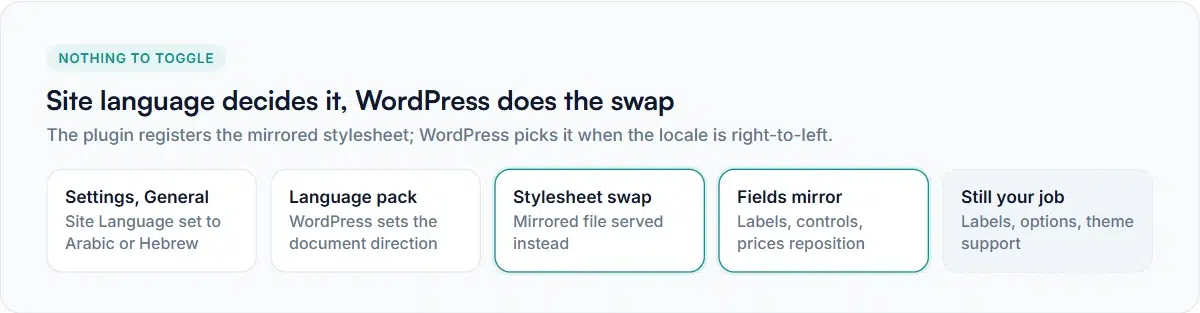
Install an Arabic, Hebrew, Persian or Urdu language pack and set your site language. WordPress then serves the right-to-left stylesheet automatically — the plugin ships a mirrored stylesheet for the storefront and another for the admin, and registers them so WordPress swaps them in when the site is right-to-left. No setting to toggle.
Arabic, Hebrew, Persian and Urdu stores read right to left, and a product page that doesn’t mirror properly looks broken in a way that costs sales immediately. WooCommerce RTL product add-ons are one of the places it tends to go wrong, because add-on fields are generated by a plugin rather than your theme.
The good news is that WordPress has a mechanism for this and it works well when a plugin uses it. Here’s what happens, what to check, and the handful of things no stylesheet can fix for you.
How WordPress decides a site is right to left
It comes from the site language, not from a plugin setting. Go to Settings → General → Site Language and choose Arabic, Hebrew, Persian or another right-to-left locale. WordPress downloads the language pack, sets the document direction, and from then on asks every registered stylesheet for its right-to-left version.
Smart Add-Ons ships mirrored stylesheets for both the storefront and the admin, and registers the storefront one so WordPress substitutes it whenever the site is right-to-left. Nothing to enable — change the site language and the fields mirror.
What mirroring changes in WooCommerce RTL product add-ons
People expect the text to flip and are then surprised by how much else moves. In a properly mirrored add-on group:
- Labels and help text align to the right.
- Checkboxes and radio buttons move to the right of their labels.
- Indentation on nested or conditional fields flips side.
- The price beside an option sits on the opposite side from the label.
- Dropdown arrows and any directional icons flip.
What does not flip is anything numeric that shouldn’t: prices read in their normal order, and so do dates and phone numbers. This is correct and occasionally reported as a bug by people expecting a mirror image of the page.
Checking a right-to-left store properly
- Switch the site language and reload a product with a group. Fields should mirror without you clearing anything.
- Check a long label. Truncation and wrapping are where mirrored layouts break first.
- Check a field with a price beside the option. The price should be on the opposite side from left-to-right.
- Add to cart and read the cart line. Add-on rows should mirror too.
- Open the mini-cart drawer, which uses its own styling and is the most commonly missed spot.
- Check the phone width. Mirrored layouts and narrow screens interact badly if either is only half-done.
What the stylesheet cannot do for you
Mirroring WooCommerce RTL product add-ons is presentation only. Three things remain your job, and they matter more than the layout:
Your own labels and options
Field labels, descriptions and option names are content you typed. A right-to-left stylesheet places them correctly; it doesn’t translate them. If your store serves one language, write them in that language. If it serves several, you need a translation layer.
Validation messages you didn’t write
Messages like “must be no more than 20 characters” come from the plugin and are translatable, so they follow your language pack where a translation exists. Where one doesn’t, they stay in English while your own labels are in Arabic — a mix worth checking before launch. See the validation guide for which messages exist.
Your theme
If the theme’s own product page isn’t mirrored, add-on fields that mirror correctly will look more wrong, not less, because they’ll be the only right-to-left element on a left-to-right page. Confirm the theme declares right-to-left support before blaming a plugin.
If your WooCommerce RTL product add-ons aren’t mirroring
- Check the site language is actually a right-to-left locale, not English with a translation plugin pointed at Arabic. WordPress decides direction from the locale.
- Purge the page cache and any CSS optimiser. A combined or cached stylesheet built while the site was left-to-right will keep serving the wrong file.
- Look for theme or custom CSS forcing a direction — a hard-coded
text-align: lefton a container will override anything the plugin does.
Getting WooCommerce RTL product add-ons right is mostly about testing in the real language rather than configuring anything. Start from the first week checklist for the build itself, and see the WordPress right-to-left documentation (opens in new tab) for how the direction and stylesheet swap work underneath.


Comments