Quick answer
Which WooCommerce product add-ons plugin should you choose?
On a zero budget, start with a free plugin from WordPress.org such as Advanced Product Fields or Acowebs Product Addons, which both include conditional logic in their free versions. For simple options with official WooCommerce support, the WooCommerce Product Add-Ons extension ($79 a year) works, but it has no built-in conditional logic. Barn2 Product Options ($149 a year, one site) has the widest paid feature set. Smart Add-Ons (from $89 a year) includes conditional logic on its entry plan and adds analytics and A/B testing on Pro, which covers three sites for $149.
This guide compares the best WooCommerce product add-ons plugins on the things that decide a purchase: price for one site, whether there’s a free version, which plan includes conditional logic, and whether prices can be calculated with a formula. A disclosure first: we make Smart Add-Ons, one of the eight plugins below. To keep the comparison fair, every price, install count and rating was checked on the vendor’s own page or on WordPress.org on 1 October 2026. We also say plainly where another plugin fits better than ours.

The best WooCommerce product add-ons plugins at a glance
| Plugin | Free on WordPress.org | Paid price, 1 site / year | Conditional logic | Formula pricing |
|---|---|---|---|---|
| WooCommerce Product Add-Ons (official) | No | $79 | Not built in | Not listed |
| Barn2 WooCommerce Product Options | No | $149 | Yes | Yes |
| Smart Add-Ons (Dhyan Software) | No | $89 Starter, $149 Pro (3 sites) | Yes, every plan | Pro |
| Advanced Product Fields (Studio Wombat) | Yes, 50,000+ installs | Pro version | Yes, in the free version | Pro |
| Product Addons for WooCommerce (Acowebs) | Yes, 30,000+ installs | Premium version | Yes, in the free version | Premium |
| Extra Product Options (ThemeHigh) | Yes, 30,000+ installs | Premium version | Product and category rules free; field-value rules premium | Premium |
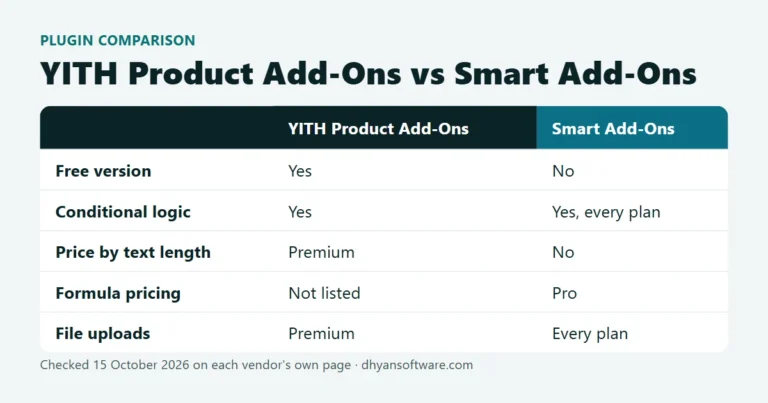
| YITH WooCommerce Product Add-Ons | Yes, 20,000+ installs | Premium version | Yes, in the free version | Not listed |
| PPOM (Themeisle) | Yes, 20,000+ installs | Pro version | Yes, in the free version | Not listed |
How we compared the best WooCommerce product add-ons plugins
Every plugin here adds fields such as text boxes, dropdowns, checkboxes and file uploads to a WooCommerce product page, and charges extra for the choices. If that idea is new, read what WooCommerce product add-ons are first. The differences that matter when buying are:
- Conditional logic: showing a field only after an earlier choice, such as showing “Engraving text” only when “Add engraving” is ticked. Without it, long option forms get confusing fast. See how conditional product options work.
- Pricing rules: flat fees and percentages are standard. Formula pricing, which calculates a price from other fields (for example width × height), matters for made-to-measure products. See WooCommerce formula pricing.
- Free version: a free core on WordPress.org lets you test on your own store before paying.
- Price per site: agencies and owners of several stores pay very different totals depending on how many sites a license covers.
The eight plugins, one by one
1. WooCommerce Product Add-Ons (official extension)
Built and sold by WooCommerce itself at $79 a year (opens in new tab), with 100,000+ active installs and a 3.4 out of 5 rating from 49 reviews on WooCommerce.com. It covers dropdowns, image and radio choices, checkboxes, short and long text, file upload, customer-defined price, quantity and date picker, with flat, percentage and quantity-based fees. The gap is conditional logic: WooCommerce’s own FAQ says the extension doesn’t show or hide fields based on earlier selections, and points buyers to Gravity Forms with a separate Product Add-Ons extension instead. Best for simple, fixed option lists where official support matters most.
2. Barn2 WooCommerce Product Options
Barn2’s plugin (opens in new tab) costs $149 a year for one site and $249 for up to five. It lists 16+ field types, conditional logic, formula price calculators, file uploads, image and color swatches, and character-count pricing (charging per letter typed). There’s a demo site and an editable admin demo, and it’s rated 4.96 out of 5 by Barn2’s own customers. Best for stores that want the widest paid feature set from an established vendor and are fine paying per site.
3. Smart Add-Ons (ours)
Smart Add-Ons has ten field types (text, textarea, dropdown, radio, checkbox, checkbox group, image select, date, file upload and custom price), with conditional logic, validation and a live price preview on every plan. Starter is $89 a year for one production site. Pro is $149 a year for three production sites and adds formula pricing, an add-on analytics dashboard, A/B testing of option groups and AI upsell suggestions. It works with classic and block checkout, the plugin is GPL, and every license has a 30-day, any-reason refund. You can try every field on the live demo store.
Honest limits: version 1.0.0 came out on 30 September 2026, so it has no long track record or public reviews yet. It has no free WordPress.org version, fewer field types than Barn2, and no character-count pricing. Best for stores that want conditional logic on the entry plan, or owners of two or three stores who want analytics and A/B testing for one price.
4. Advanced Product Fields for WooCommerce (Studio Wombat)
The most-installed free option here: 50,000+ active installs (opens in new tab) and 4.8 out of 5 from 283 ratings. The free version has ten field types, conditional logic and flat-fee pricing. The Pro version adds file upload, image and color swatches, date pickers and formula pricing, with a 14-day refund. Best for trying conditional logic at no cost.
5. Product Addons for WooCommerce (Acowebs)
30,000+ active installs (opens in new tab) and 4.9 out of 5 from 470 ratings, the most-reviewed plugin in this list. The free version has a drag-and-drop builder and conditional fields. Premium goes to 25+ field types with formulas, file uploads (including to Amazon S3), repeaters and multi-step layouts. Best for a large feature set that starts free.
6. Extra Product Options (ThemeHigh)
30,000+ active installs (opens in new tab) and 4.9 out of 5 from 218 ratings. The free version has about 20 field types and display rules by product, category and tag, but no price per field. Premium adds pricing (fixed, percentage, formula and character count), file upload and rules based on other fields’ values. Best for collecting extra information for free when the options themselves don’t cost extra.
7. YITH WooCommerce Product Add-Ons
20,000+ active installs (opens in new tab) and 3.7 out of 5 from 57 ratings. The free version covers radio buttons, text, dropdowns and checkboxes, conditional logic between option blocks, and fixed or percentage prices. Premium adds file uploads, date and color pickers, product selectors and role-based visibility. Best for stores already using other YITH plugins.
8. PPOM – Product Addons & Custom Fields (Themeisle)
20,000+ active installs (opens in new tab) and 4.5 out of 5 from 282 ratings. The free version includes conditional logic and per-option pricing. PPOM Pro adds 30+ input types, including an image cropper, file uploads and a variation quantity matrix. Best for unusual inputs such as image cropping.
Which one should you pick?
- No budget yet: start with Advanced Product Fields or Acowebs. Both include conditional logic for free.
- A few fixed options, official support: the WooCommerce Product Add-Ons extension.
- The most field types, or price per character: Barn2 Product Options.
- Conditional logic on the cheapest plan, plus analytics and A/B testing across up to three stores: Smart Add-Ons. Compare it with the official extension in WooCommerce Product Add-Ons alternative, or with Barn2 in Barn2 Product Options alternative.
Whichever of the best WooCommerce product add-ons plugins you choose, check two things on a staging copy before going live: that the plugin works with the checkout you use (classic or block checkout), and that the chosen options show correctly in the cart, order emails and admin order screen. Then decide whether the choices should be options at all or variations.
Best WooCommerce product add-ons plugins FAQ
Does WooCommerce include product add-ons for free?
No. WooCommerce core includes variable products (size, color and so on) but no way for a customer to type text, upload a file or tick a paid extra. You need a plugin, either the paid official extension or one of the others above. Several of the best WooCommerce product add-ons plugins have free versions on WordPress.org.
Which add-ons plugins have conditional logic?
All of the best WooCommerce product add-ons plugins in this list have it in some tier except the official extension, which doesn’t have it built in. Advanced Product Fields, Acowebs, YITH and PPOM include it in their free versions, ThemeHigh includes field-value rules in premium, and Smart Add-Ons includes it on every plan.
Can I switch add-ons plugins later?
Yes, but option setups don’t transfer between plugins, so you rebuild your fields in the new one. Past orders keep the choices that were saved on each order’s line items. Switching is easiest on a staging site, one product at a time, before the busy season.
Prices and ratings for the best WooCommerce product add-ons plugins change often; re-check them on each vendor’s page before buying. If you’d like to see conditional logic and a live price preview on a real store, open the Smart Add-Ons demo.