Quick answer
What is a good WooCommerce Product Add-Ons alternative?
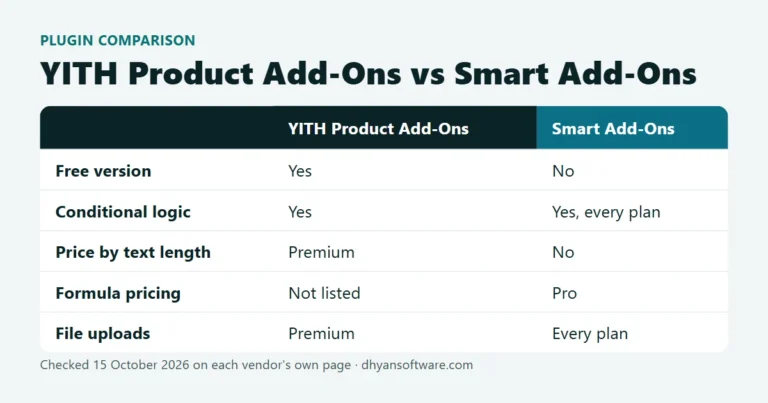
If you need fields that appear only after an earlier choice, the official WooCommerce Product Add-Ons extension can't do it on its own; WooCommerce's FAQ recommends Gravity Forms plus a separate extension instead. Smart Add-Ons is an alternative with conditional logic on every plan from $89 a year, and formula pricing, add-on analytics and A/B testing on Pro ($149 a year for three sites). If your options are a short fixed list, the official extension at $79 a year is still a reasonable choice.
Most stores look for a WooCommerce Product Add-Ons alternative for one of two reasons: they need conditional logic, or they need a price calculated from what the customer enters. This post compares the official extension with Smart Add-Ons, the plugin we make, and says when the official one is the better buy. Facts about the official extension come from its WooCommerce.com product page and FAQ (opens in new tab), checked on 1 October 2026.

What the official extension does well
WooCommerce Product Add-Ons is built and supported by WooCommerce itself, costs $79 a year for one site, and has 100,000+ active installs. It covers the common field types: dropdown, image and radio choices, checkboxes, short and long text, file upload, a customer-defined price, quantity and a date picker. Prices can be a flat fee, a percentage or quantity-based. For a store with a handful of fixed options per product, such as gift wrap or a short engraving line, that’s enough.
Where stores outgrow it
No conditional logic. The extension’s FAQ says it does not show or hide fields based on a customer’s earlier selections, and recommends Gravity Forms with the Gravity Forms Product Add-Ons extension for that. Without conditional logic, a product with several optional extras shows every field at once. With it, “Engraving text” appears only after “Add engraving” is ticked, and a vegan cheese choice appears only for vegan pizzas. Here’s how conditional product options work in practice.
No formula pricing listed. Made-to-measure products such as table tops, banners or curtains need a price calculated from the customer’s numbers, for example width × height × a rate. The extension lists flat, percentage and quantity-based fees only. See WooCommerce formula pricing for how a formula field works.
No add-on analytics or testing listed. You can see total order revenue in WooCommerce, but not which add-on fields customers view, pick and pay for, or whether a different option layout sells more.
Smart Add-Ons as a WooCommerce Product Add-Ons alternative
| WooCommerce Product Add-Ons | Smart Add-Ons | |
|---|---|---|
| Price / year | $79, one site | $89 Starter (one site), $149 Pro (three sites) |
| Field types | Choices, checkboxes, text, file upload, customer price, quantity, date | Text, textarea, dropdown, radio, checkbox, checkbox group, image select, date, file upload, custom price |
| Conditional logic | Not built in | Every plan |
| Flat and percentage pricing | Yes | Yes |
| Formula pricing | Not listed | Pro |
| Add-on analytics, A/B testing | Not listed | Pro |
| Refund | 30 days | 30 days, any reason |
Smart Add-Ons Starter covers the same everyday job as the official extension, plus conditional logic with AND/OR rules, validation, import and export of option groups, and secure file uploads. Pro adds formula pricing using the base price, quantity and other fields, an analytics dashboard showing views, selections and add-on revenue from paid orders, A/B testing of two option groups on the same product, and AI upsell suggestions. A Pro license covers three production sites.
When to keep the official extension
- Every product has a short, fixed list of options and nothing depends on an earlier choice.
- You already pay for several WooCommerce.com extensions and want one vendor for support.
- You run one store and $10 a year matters more than conditional logic.
How to switch without breaking orders
- Copy your live store to a staging site.
- Install Smart Add-Ons on staging and activate your license. Every plan also allows three non-production sites, so staging doesn’t use up your production site.
- Rebuild each product’s options as an add-on group. Option setups don’t transfer between plugins, but a group can be assigned to a whole category, so shared options are built once.
- Place test orders and check the cart, the order emails and the admin order screen.
- On the live site, set up the groups, then deactivate the official extension. Past orders keep the choices saved on their line items.
WooCommerce Product Add-Ons alternative FAQ
Can I run both plugins at the same time?
Technically yes, but don’t put both on the same product: the customer would see two sets of fields and two price adjustments. Move products across one at a time, or switch everything at once on staging first.
Is there a free WooCommerce Product Add-Ons alternative?
Yes. Several plugins on WordPress.org have free versions with conditional logic, including Advanced Product Fields and Acowebs Product Addons. Our comparison of the best WooCommerce product add-ons plugins lists eight options, free and paid, with prices checked on the same date.
Can I try Smart Add-Ons before buying?
Yes. The live demo store has ten example products using conditional logic, image swatches, file uploads and a live price preview. Every license also has a 30-day refund for any reason, so the choice of WooCommerce Product Add-Ons alternative can be tested on your own store too. Plans and prices are on the Smart Add-Ons page.